Support
Let people start a conversation from your app — not just answer yours — and reply from a Support inbox that works like Feedback.
PanelUI components are native-only for now
Support works on the web through the SDK. The PanelUI components the App version builds its support screen from — Support, Textarea and Button — are React Native components and don't run in a browser yet. A contact form on the web is the same flow in plain markup.
Feedback is the app asking. Support is the user asking: "I can't sign in", "where did my data go". One call opens a conversation that lands in the project's Support inbox, on every plan.
const { conversation } = await studio.support.start("I can't sign in since the update.");Pass an object for more context — the same fields a report takes, apart from
rating and tags:
await studio.support.start({
  message: "Checkout fails on the last step.",
  screen: '/checkout/confirm',
  fields: { order_id: 'A-1042' },
});
The conversation
A support conversation is a thread like any other, so everything in Conversations applies unchanged:
const { messages, send } = useConversation(conversation.id);feedback.list() returns support conversations too, marked
kind: "support", so one "My messages" screen can show both.
What counts
Support conversations use the workspace's monthly allowance, the same rate
limits, and the same email, Slack and webhook notifications (support.created)
as reports. Your team sees them in their own inbox, with the same statuses,
tags and replies.
A contact form on the web
A message box that starts the conversation, then shows its thread with the
Thread component from Conversations:
'use client';

import { useState } from 'react';
import { isStudioError } from 'panelui-studio';
import { useStudio } from 'panelui-studio/react';

import { Thread } from './thread';

export function ContactSupport() {
  const studio = useStudio();
  const [conversationId, setConversationId] = useState<string | null>(null);
  const [error, setError] = useState<string | null>(null);

  if (conversationId) return <Thread feedbackId={conversationId} />;

  async function start(event: React.FormEvent<HTMLFormElement>) {
    event.preventDefault();
    const message = String(new FormData(event.currentTarget).get('message')).trim();
    if (!message) return;
    try {
      const { conversation } = await studio.support.start({ message, screen: window.location.pathname });
      setConversationId(conversation.id);
    } catch (caught) {
      setError(isStudioError(caught) ? caught.message : "Couldn't send that. Check your connection.");
    }
  }

  return (
    <form onSubmit={start}>
      <label htmlFor="support-message">How can we help?</label>
      <textarea id="support-message" name="message" required />
      {error ? <p role="alert">{error}</p> : null}
      <button type="submit">Send</button>
    </form>
  );
}
Earlier conversations come from useFeedbackList(), filtered to
kind === 'support'.
Usage with PanelUI
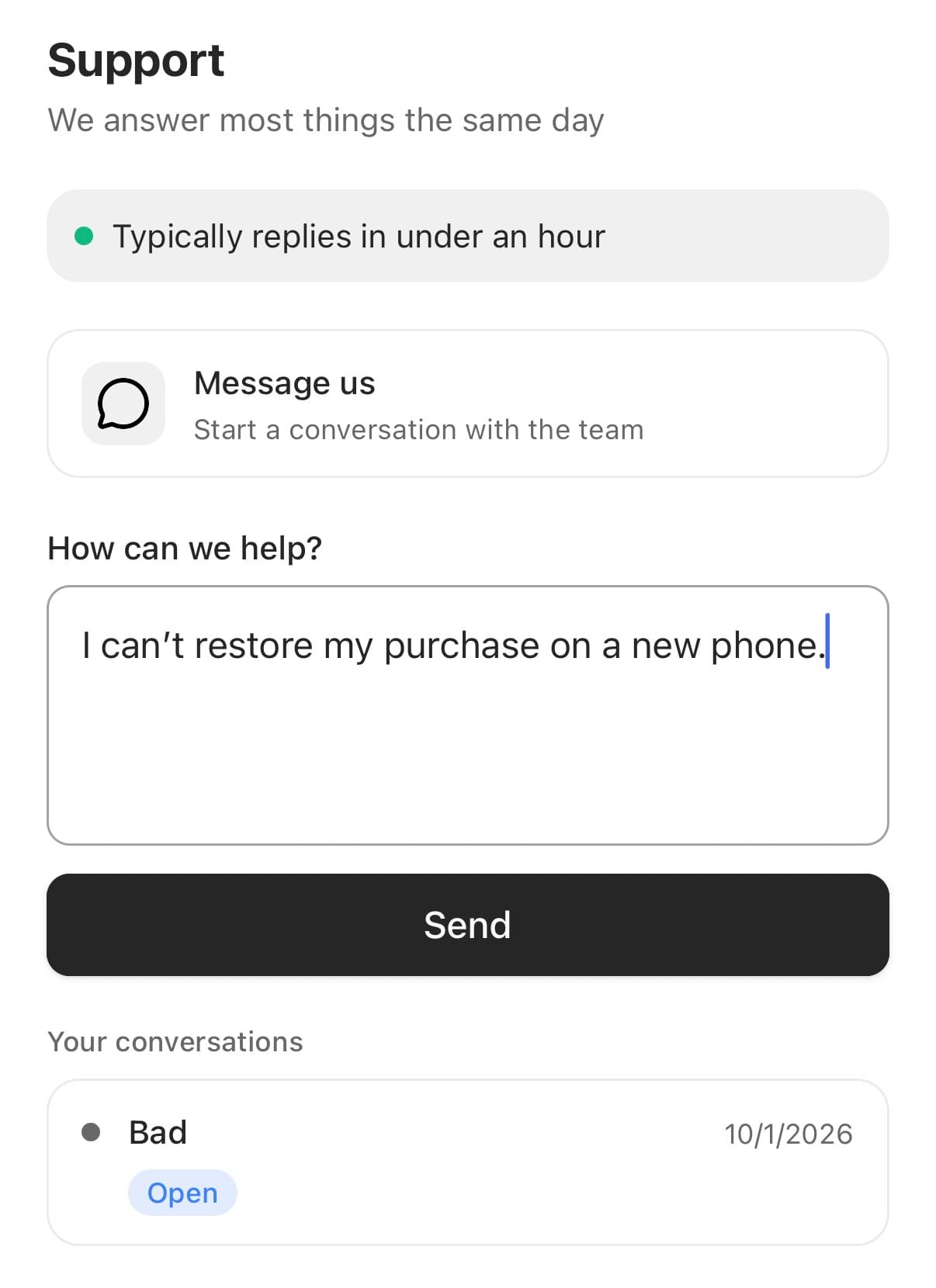
support.start works from any screen. If your app uses PanelUI, its
Support screen is a ready-made front door: a
Message us channel opens a Textarea, and
sending starts the conversation and opens its thread. The user's earlier
conversations sit underneath.
import { useState } from 'react';
import { View } from 'react-native';
import { router } from 'expo-router';
import { Button, MessageCircleIcon, Support, Textarea } from 'panelui-native';
import { useFeedbackList, useStudio } from 'panelui-studio/react';

const status = { new: 'open', in_progress: 'open', resolved: 'solved', archived: 'closed' } as const;

export default function SupportScreen() {
  const studio = useStudio();
  const { items } = useFeedbackList();
  const [writing, setWriting] = useState(false);
  const [draft, setDraft] = useState('');
  const [sending, setSending] = useState(false);

  async function start() {
    setSending(true);
    try {
      const { conversation } = await studio.support.start({ message: draft.trim(), screen: '/support' });
      setDraft('');
      setWriting(false);
      router.push(`/thread/${conversation.id}`);
    } finally {
      setSending(false);
    }
  }

  return (
    <Support availability="online">
      <Support.Header title="Support" description="We answer most things the same day" />
      <Support.Status replyTime="Typically replies in under an hour" />

      <Support.Channels>
        <Support.Channel
          icon={<MessageCircleIcon />}
          label="Message us"
          description="Start a conversation with the team"
          onPress={() => setWriting(true)}
        />
      </Support.Channels>

      {writing ? (
        <View className="gap-3">
          <Textarea label="How can we help?" rows={4} value={draft} onChangeText={setDraft} />
          <Button loading={sending} disabled={!draft.trim()} onPress={start}>
            Send
          </Button>
        </View>
      ) : null}

      <Support.Conversations title="Your conversations">
        {items
          .filter((item) => item.kind === 'support')
          .map((item) => (
            <Support.Conversation
              key={item.id}
              title={item.message}
              status={status[item.status]}
              timestamp={new Date(item.lastMessageAt ?? item.createdAt).toLocaleDateString()}
              updated={item.replies > 0}
              onPress={() => router.push(`/thread/${item.id}`)}
            />
          ))}
      </Support.Conversations>
    </Support>
  );
}
/thread/[id] is the same thread screen as in
Conversations. The status pill
and the reply time are yours to write; Studio doesn't set them.