

Task
One step an agent took, and what it did while it was there.
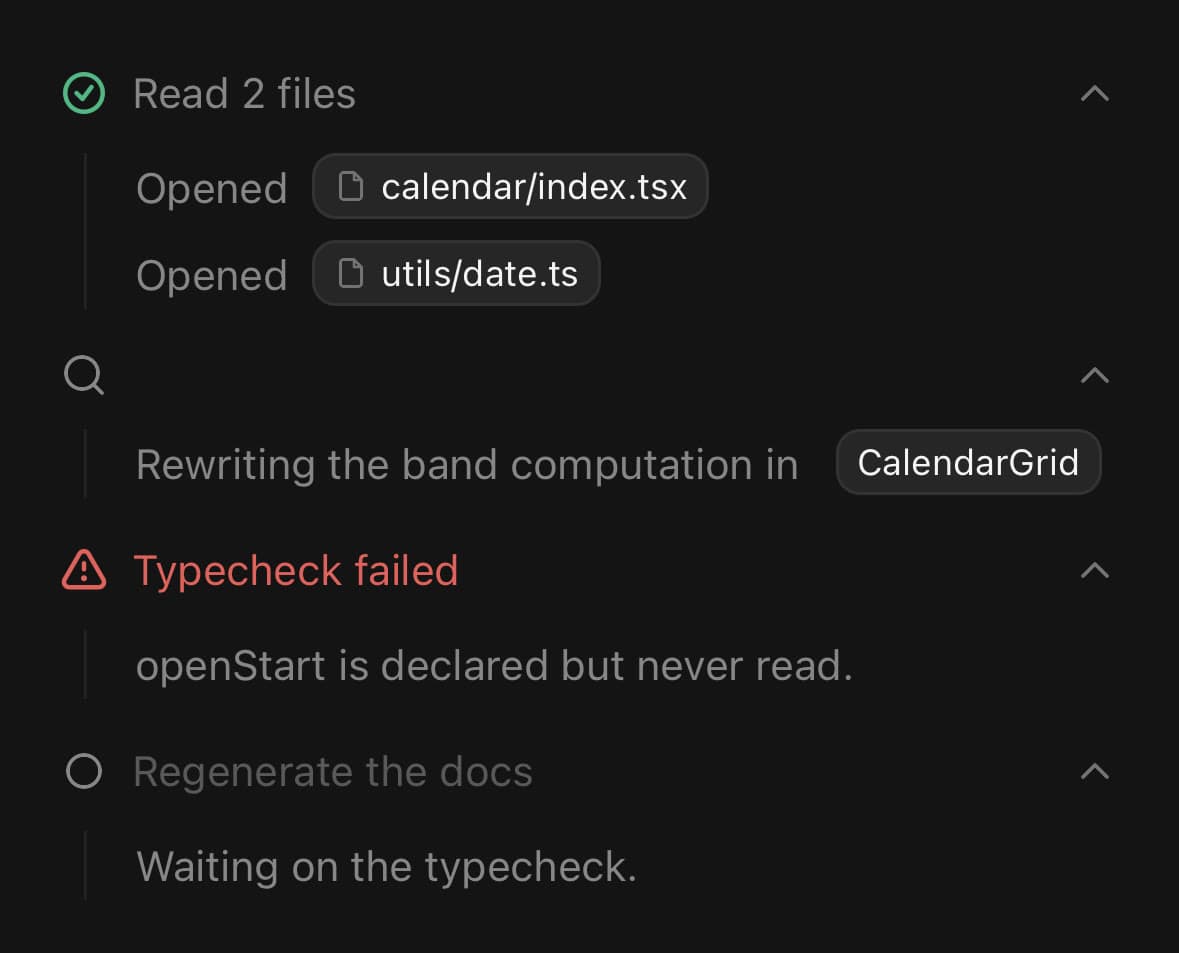
One step an agent took, and what it did while it was there.
The header is the step; the body is the detail nobody reads unless something went wrong.
Open by default, and it stays open. Unlike a Reasoning trace, the steps are the record of what happened and are worth scrolling back through.
status moves the leading glyph through pending, running, complete and error, and shimmers the title while it runs.
Installation
Task ships with the library — no separate install.
import { Task, Marker, FileIcon } from 'panelui-native';Or copy the source into your project, to own and edit it:
npx panelui-cli@latest add taskUsage
<Task status="running">
  <Task.Trigger title="Searching the codebase" />
  <Task.Content>
    <Task.Item>
      Read <Task.File>calendar/index.tsx</Task.File>
    </Task.Item>
  </Task.Content>
</Task>
Composition
<Task>
  <Task.Trigger>…</Task.Trigger>
  <Task.Content>…</Task.Content>
  <Task.Item>…</Task.Item>
  <Task.File>…</Task.File>
</Task>Task.Trigger— The step. Shimmers its title while the status isrunning, and folds the body away.Task.Content— What the step did, indented behind a rule so the lines read as belonging to the step above them.Task.Item— One line of that.Task.File— A filename inside a line, drawn as a bordered chip — a path in the middle of a sentence is otherwise indistinguishable from the sentence.
Examples
A step and its detail
status is the whole state: it picks the glyph, tints the title on an error, and puts a shimmer on the title while the step is running.

<Task status="complete">
  <Task.Trigger title="Read 4 files" />
  <Task.Content>
    <Task.Item>
      Opened <Task.File>calendar/index.tsx</Task.File>
    </Task.Item>
    <Task.Item>
      Opened <Task.File>date-picker/index.tsx</Task.File>
    </Task.Item>
  </Task.Content>
</Task>
Every status
pending is a step that has not started, running shimmers, complete ticks, and error tints the title. A run of tasks in those four states is what an agent transcript looks like partway through.
<Task status="complete">
  <Task.Trigger title="Read the component" />
  <Task.Content>…</Task.Content>
</Task>

<Task status="running">
  <Task.Trigger title="Editing the range band" />
  <Task.Content>…</Task.Content>
</Task>

<Task status="error">
  <Task.Trigger title="Typecheck failed" />
  <Task.Content>…</Task.Content>
</Task>

<Task status="pending" defaultOpen={false}>
  <Task.Trigger title="Regenerate the docs" />
  <Task.Content>…</Task.Content>
</Task>
Reading tool-call parts
With the AI SDK a task is a tool-call part. part.type is tool-<name>, and part.state runs input-streaming → input-available → output-available or output-error — which maps onto status directly.
const STATUS = {
  'input-streaming': 'pending',
  'input-available': 'running',
  'output-available': 'complete',
  'output-error': 'error',
} as const;

{message.parts.map((part, i) =>
  part.type.startsWith('tool-') ? (
    <Task key={i} status={STATUS[part.state]}>
      <Task.Trigger title={part.type.replace('tool-', '')} />
      <Task.Content>
        <Task.Item>{JSON.stringify(part.input)}</Task.Item>
      </Task.Content>
    </Task>
  ) : null
)}
A glyph for the file's kind
icon on a Task.File sits before the name, which is what makes a long list of paths scannable by kind rather than by reading each one.
<Task.Item>
  Wrote{' '}
  <Task.File icon={<FileIcon size={12} />}>
    theme.css
  </Task.File>
</Task.Item>
Between the turns
A run of steps belongs between two messages rather than inside either, which is what Marker is for — it draws the rule that separates the work from the conversation.
<Marker variant="separator">
  <Marker.Content>Ran 3 tools</Marker.Content>
</Marker>

<Task status="complete">
  <Task.Trigger title="Read 4 files" />
  <Task.Content>
    <Task.Item>
      Opened <Task.File>calendar/index.tsx</Task.File>
    </Task.Item>
  </Task.Content>
</Task>
Variants
status
pendingrunningcomplete(default)error
<Task status="pending">…</Task>
<Task status="running">…</Task>
<Task status="complete">…</Task>
<Task status="error">…</Task>
API Reference
Task
| Prop | Type | Default | Description |
|---|---|---|---|
className | string | — | |
status | TaskStatus | 'complete' | Where the step has got to. Drives the leading glyph, and puts a shimmer on the title while it is running. |
open | boolean | — | Controlled open state. |
defaultOpen | boolean | true | Initial state when uncontrolled. Open — the steps are the record. |
onOpenChange | (open: boolean) => void | — |
Task.Trigger
| Prop | Type | Default | Description |
|---|---|---|---|
className | string | — | |
title | string | — | What the step is. Shimmers while the status is running. |
icon | ReactNode | — | Leading glyph. Derived from status when not given. |
Task.Content
| Prop | Type | Default | Description |
|---|---|---|---|
className | string | — |
Task.Item
| Prop | Type | Default | Description |
|---|---|---|---|
className | string | — |
Task.File
| Prop | Type | Default | Description |
|---|---|---|---|
className | string | — | |
icon | ReactNode | — | A glyph for the file's kind, drawn before the name. |
Every part also accepts the underlying React Native props (ViewProps or TextProps) and a className for Tailwind utilities.
Notes
It stays open. A reasoning trace folds itself away because it stops being interesting once the answer starts; a task does not, because the steps are the record. Pass defaultOpen={false} for a step whose detail is noise — a pending one, usually.
The body is indented behind a rule, not merely padded. The rule is what says the lines belong to the step above them rather than being the next few steps, which matters the moment there is more than one task in a row.
Task.File is bordered on purpose. A path in the middle of a sentence set only in monospace still reads as part of the sentence, and the paths are the part of a task line anyone actually scans for.
Nothing here depends on the AI SDK. status is a string union that happens to line up with a tool part's state.
Public exports
Values: Task
Types: TaskProps, TaskTriggerProps, TaskContentProps, TaskItemProps, TaskFileProps, TaskStatus