

Flow
Pan-and-zoom canvas of draggable nodes joined by animated edges.
A canvas of frames joined by edges, panned, pinched and rearranged with a finger.
An edge names the two nodes it joins rather than a pair of coordinates, and works out which faces to leave and arrive on from where those nodes currently are — so a graph the reader rearranges stays readable with nothing re-specified.
Installation
Flow ships with the library — no separate install.
import { Flow, Frame, Badge, Text, Button, type FlowConnection } from 'panelui-native';Or copy the source into your project, to own and edit it:
npx panelui-cli@latest add flowUsage
<Flow fitViewOnMount>
  <Flow.Background variant="dots" />
  <Flow.Node id="db" position={{ x: 20, y: 40 }}>
    <Frame>…</Frame>
  </Flow.Node>
  <Flow.Node id="web" position={{ x: 120, y: 260 }}>
    <Frame>…</Frame>
  </Flow.Node>
  <Flow.Edge from="web" to="db" variant="smoothstep" dashed arrow />
  <Flow.Controls />
</Flow>
Composition
<Flow onConnect={…} onNodeDragEnd={…}>
  <Flow.Background />
  <Flow.Group id="…" label="…" position={…} size={…}>
    <Flow.Node id="…" position={…}>
      <Frame>…</Frame>
      <Flow.Handle id="out" position="bottom" type="source" />
    </Flow.Node>
  </Flow.Group>
  <Flow.Edge from="…" to="…" arrow />
  <Flow.Controls />
  <Flow.MiniMap />
</Flow>Flow.Background— The grid behind everything — dots, lines or crosses. Rides the canvas, so it pans and zooms with the graph.Flow.Node— One frame on the canvas. Its content is yours; aFrameis the usual answer.Flow.Handle— A named port. Both the point an edge can be pinned to and the grip a new connection is dragged from.Flow.Edge— A line between two nodes — or between two groups, named the same way. Routed as a curve, a stepped run or a straight line.Flow.Group— A labelled box drawn around a region of the canvas. Moves the nodes inside it, and can be joined to another container by an edge.Flow.Controls— Zoom, fit and lock buttons. Sits outside the transform, so it stays put.Flow.MiniMap— An overview of the whole graph with the visible region marked on it.
Examples
A node is a frame
A node positions and drags; what it looks like is yours. A Frame is the usual answer, since a node is a titled card of rows more often than it is anything else.
<Flow.Node id="ghost" position={{ x: 96, y: 250 }}>
  <Frame className="w-56">
    <Frame.Header className="flex-row items-center gap-3">
      <Frame.Media><PackageIcon size={20} /></Frame.Media>
      <Frame.Content>
        <Text weight="semibold">ghost-image</Text>
        <Text size="xs" muted>blog.temetro.com</Text>
      </Frame.Content>
    </Frame.Header>
    <Frame.Panel>
      <Frame.Row>
        <Frame.Content><Text size="sm" muted>Online</Text></Frame.Content>
      </Frame.Row>
    </Frame.Panel>
  </Frame>
</Flow.Node>
Edges name nodes, not coordinates
With no handle named, an edge picks its two faces from where the boxes currently sit — whichever axis they are further apart on wins — and picks again as they move. Drag a frame and the line leaves from a different side.
{/* Faces chosen from the layout, and re-chosen as the frames move. */}
<Flow.Edge from="web" to="db" />

{/* Stepped wiring with an arrowhead on the target. */}
<Flow.Edge from="web" to="db" variant="smoothstep" arrow />

{/* Dashed, for a dependency that is live rather than declared. */}
<Flow.Edge from="queue" to="worker" dashed animated arrow />
Pinning an edge to a port
For a diagram where the sides mean something — accepted out of one port, rejected out of another. nodeId.handleId pins an end, and two handles on the same face are kept apart by their offset. Four ports is where naming them starts to pay: router.retry says which one an edge means.
<Flow.Node id="router" position={{ x: 520, y: 30 }}>
  <Frame>…</Frame>
  <Flow.Handle id="in" position="left" type="target" offset={0.3} />
  <Flow.Handle id="retry" position="left" type="target" offset={0.78} />
  <Flow.Handle id="metrics" position="top" type="source" />
  <Flow.Handle id="logs" position="bottom" type="source" />
</Flow.Node>

<Flow.Edge from="index.out" to="router.in" variant="smoothstep" arrow />
<Flow.Edge from="deadletter.out" to="router.retry" dashed arrow />
Building a graph at runtime
The canvas keeps no list of its own. Adding a frame is adding to an array, and so is linking two of them.
const [nodes, setNodes] = useState([{ id: 'n1', x: 40, y: 40 }]);
const [links, setLinks] = useState<{ from: string; to: string }[]>([]);

<Flow minZoom={0.35}>
  {nodes.map((node) => (
    <Flow.Node key={node.id} id={node.id} position={{ x: node.x, y: node.y }}>
      <Frame>…</Frame>
    </Flow.Node>
  ))}
  {links.map((link) => (
    <Flow.Edge
      key={`${link.from}-${link.to}`}
      from={link.from}
      to={link.to}
      variant="smoothstep"
      arrow
    />
  ))}
</Flow>
Wiring it up by dragging
A drag from a source handle to a target handle reports a connection. The canvas never adds the edge itself — the graph is yours, so what a new connection means is yours too.
const [edges, setEdges] = useState<FlowConnection[]>([]);

<Flow
  onConnect={(connection) => setEdges((current) => [...current, connection])}
  isValidConnection={(connection) => connection.source !== connection.target}
>
  …
  {edges.map((edge) => (
    <Flow.Edge
      key={`${edge.source}-${edge.target}`}
      from={edge.source}
      to={edge.target}
      arrow
    />
  ))}
</Flow>
Driving positions from outside
Pass position once and the canvas takes it from there. Keep it in state and pass it back, and the graph is yours to move — onNodeDragEnd reports where a frame was dropped.
const [positions, setPositions] = useState(initial);

<Flow onNodeDragEnd={(id, position) =>
  setPositions((current) => ({ ...current, [id]: position }))
}>
  {Object.entries(positions).map(([id, position]) => (
    <Flow.Node key={id} id={id} position={position}>…</Flow.Node>
  ))}
</Flow>
Holding a node inside its container
confine stops a drag at the container's edge; pinned takes the drag away entirely, so the node moves only when the container does. Both read the group the node is drawn in, and both do nothing outside one.
<Flow.Group id="core" label="Core" position={{ x: 0, y: 0 }} size={{ width: 196, height: 178 }}>
  {/* Movable, but never out of the box. */}
  <Flow.Node id="api" confine position={{ x: 14, y: 34 }}>…</Flow.Node>

  {/* Not movable at all — it travels with the container. */}
  <Flow.Node id="pg" pinned position={{ x: 14, y: 110 }}>…</Flow.Node>
</Flow.Group>
Versions
Infrastructure map
Three frames and the dependencies between them. Drag any of them and the edges re-route, leaving from whichever side is now the shorter way round.
<Flow.Edge from="ghost" to="db" variant="smoothstep" dashed animated arrow />
<Flow.Edge from="ghost" to="redis" variant="smoothstep" arrow />
Build pipeline
Stages running top to bottom, with only the edge into the running stage dashed — marking every edge says nothing about which one is live.
<Flow.Edge
  from={stage.id}
  to={next.id}
  variant="smoothstep"
  animated={index === running - 1}
  arrow
/>
Wiring it up
Drag from one port to another to create an edge. The canvas reports the connection; adding it is the screen's decision.
<Flow onConnect={(connection) => setEdges((current) => [...current, connection])}>Mind map
Curved edges radiating from a centre, with no fixed sides — drag a branch across and the edge re-routes to the face that now makes sense.
<Flow.Edge from="core" to={branch.id} variant="bezier" />Building a graph
One button adds a frame, the other adds one already wired to the last. Everything the canvas draws comes from two arrays the screen owns.
<Button onPress={() => add(false)}>Add a frame</Button>
<Button onPress={() => add(true)}>Add and link</Button>
Named ports
Edges pinned to handles instead of routed automatically, for a diagram where the sides mean something. One frame carries a port on every face, and two of them share a face at different offsets.
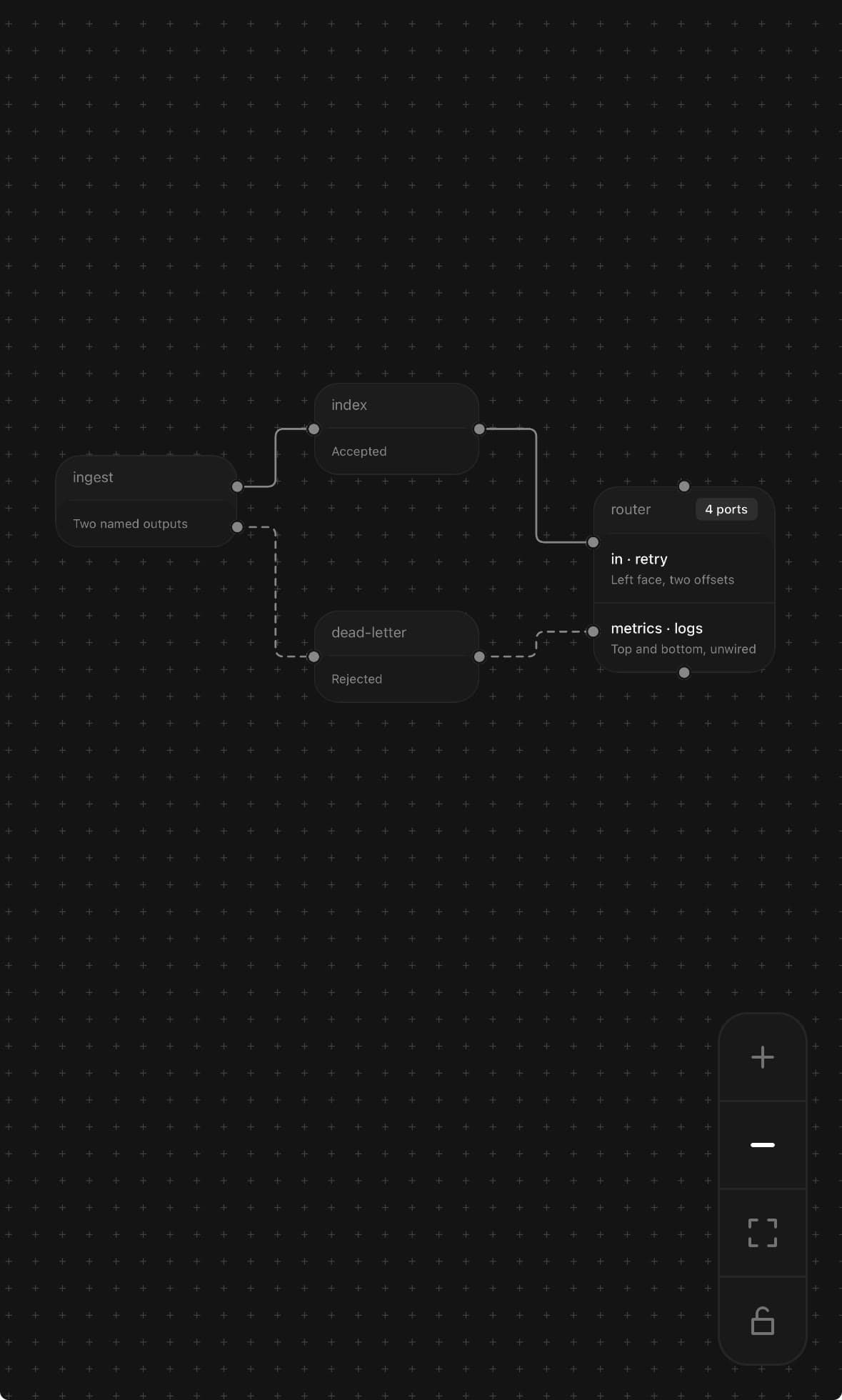
<Flow.Node id="router" position={{ x: 520, y: 30 }}>
  <Frame>…</Frame>
  <Flow.Handle id="in" position="left" type="target" offset={0.3} />
  <Flow.Handle id="retry" position="left" type="target" offset={0.78} />
  <Flow.Handle id="metrics" position="top" type="source" />
  <Flow.Handle id="logs" position="bottom" type="source" />
</Flow.Node>

<Flow.Edge from="index.out" to="router.in" variant="smoothstep" arrow />
<Flow.Edge from="deadletter.out" to="router.retry" dashed arrow />
Groups and a minimap
Two labelled containers, the dependency between them, and an overview of the parts off screen. The tiers are what is connected here: a dependency between two tiers is a fact about the tiers, and drawing it between two of their contents says something narrower and moves when the contents are rearranged. Inside, pinned holds a node still — the containers are what you drag — while confine lets one move but never out of its box.
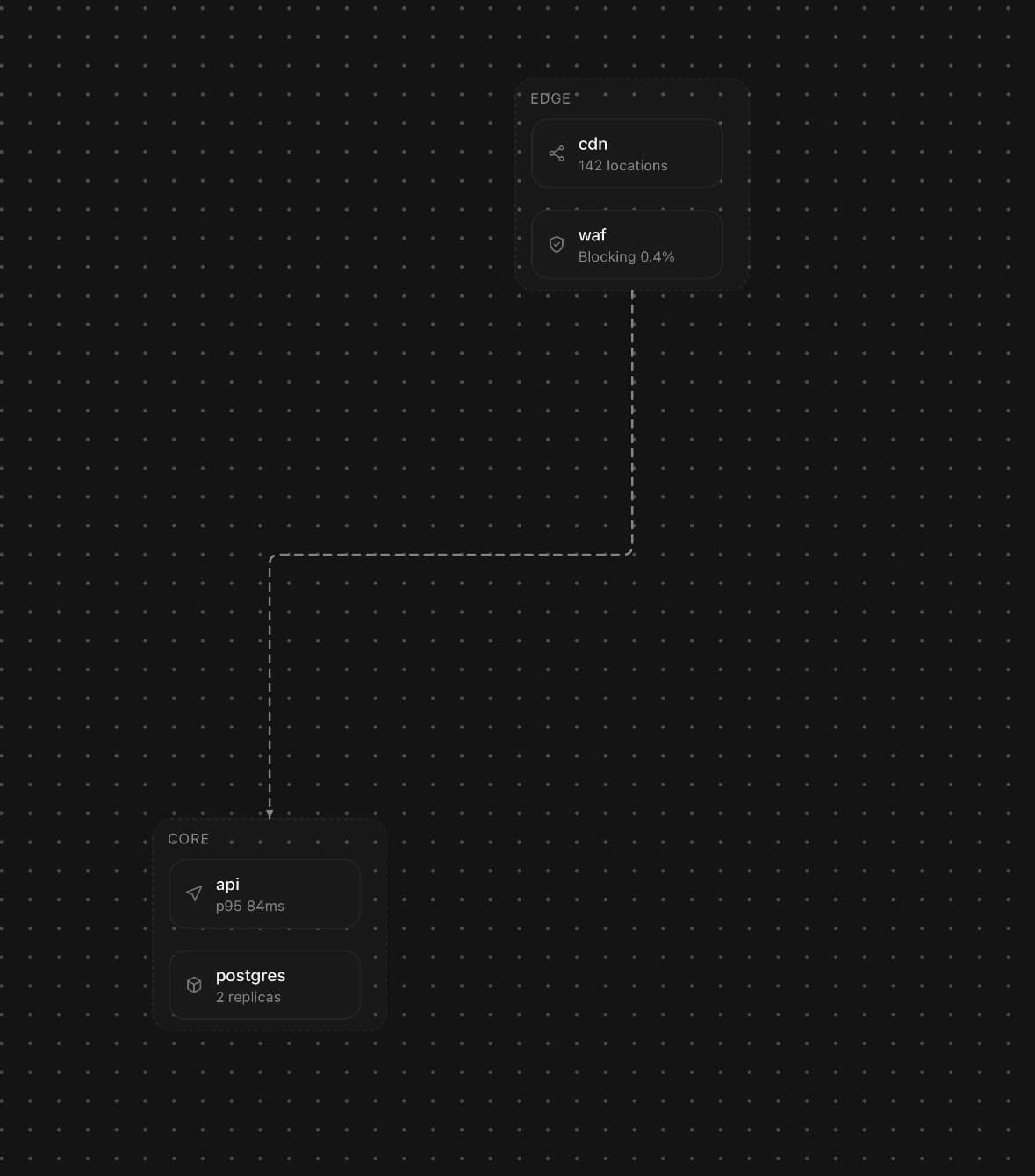
<Flow.Group id="edge-tier" label="Edge" position={{ x: 0, y: 0 }} size={{ width: 196, height: 178 }}>
  <Flow.Node id="cdn" pinned position={{ x: 14, y: 34 }}>…</Flow.Node>
  <Flow.Node id="waf" pinned position={{ x: 14, y: 110 }}>…</Flow.Node>
</Flow.Group>

<Flow.Group id="core-tier" label="Core" position={{ x: 0, y: 248 }} size={{ width: 196, height: 178 }}>
  <Flow.Node id="api" pinned position={{ x: 14, y: 282 }}>…</Flow.Node>
  <Flow.Node id="pg" confine position={{ x: 14, y: 358 }}>…</Flow.Node>
</Flow.Group>

{/* An edge names a container exactly the way it names a node. */}
<Flow.Edge from="edge-tier" to="core-tier" variant="smoothstep" animated arrow />

<Flow.MiniMap />
API Reference
Flow
| Prop | Type | Default | Description |
|---|---|---|---|
className | string | — | |
defaultViewport | FlowViewport | — | Where the canvas starts. zoom of 1 is one graph point per screen point. |
minZoom | number | 0.3 | Closest the canvas will zoom out. |
maxZoom | number | 2.5 | Closest it will zoom in. |
panOnDrag | boolean | true | Drag the empty canvas to move it. |
zoomOnPinch | boolean | true | Pinch to zoom. |
fitViewOnMount | boolean | false | Frame every node once they have all measured themselves. For a graph whose positions come from data and are not laid out against a known screen size. |
fitViewPadding | number | 48 | Padding left around the graph when fitting, in screen points. |
onViewportChange | (viewport: FlowViewport) => void | — | The canvas has moved or zoomed. Fired as it happens, on the JS thread. |
onNodeDragEnd | (id: string, position: FlowNodePosition) => void | — | A node was dropped somewhere new. The only time a drag reaches JavaScript. |
onConnect | (connection: FlowConnection) => void | — | A connection was drawn between two handles. The canvas never adds the edge itself — the graph is yours, so what a new connection means is yours too. |
isValidConnection | (connection: FlowConnection) => boolean | — | Refuse a connection before onConnect sees it. |
Flow.Background
| Prop | Type | Default | Description |
|---|---|---|---|
variant | 'dots' | 'lines' | 'cross' | 'none' | 'dots' | The mark repeated across the canvas. |
gap | number | 24 | Points between marks. |
size | number | 1.6 | How big each mark is drawn. |
color | string | — | Mark colour. Defaults to a muted theme token. |
Flow.Node
| Prop | Type | Default | Description |
|---|---|---|---|
id | string | — | Identifies the node to edges and to onNodeDragEnd. Must be unique. |
position | FlowNodePosition | — | Where it starts, in graph coordinates. |
className | string | — | |
draggable | boolean | true | Let a finger move it. |
confine | boolean | false | Keep the node inside the Flow.Group it is drawn in. A drag stops at the container's edge instead of leaving it. Ignored outside a group — there is nothing to be kept inside of. |
pinned | boolean | false | Hold the node still: it takes no drag of its own and moves only when its container does. For a diagram where the boxes are what you rearrange and their contents are a fixed part of them. |
selected | boolean | false | Draw the selected ring. |
onPress | () => void | — | Tapping the node — separate from dragging it. |
onDelete | () => void | — | Delete the node when assistive technology requests the advertised Delete node action. No delete action is exposed when this is omitted. |
accessibilityMoveStep | number | 24 | Graph points covered by each Move up, right, down or left accessibility action. |
accessibilityLabel | string | — | Spoken name. Defaults to the node's id. |
Flow.Handle
| Prop | Type | Default | Description |
|---|---|---|---|
id | string | 'default' | Names the handle to an edge, as "nodeId.handleId". |
position | FlowSide | 'right' | Which face it sits on. |
type | 'source' | 'target' | 'both' | 'both' | source starts connections, target receives them, both does either. A drag from a source can only land on a target, and the other way round. |
offset | number | 0.5 | Where along the face, 0–1. For more than one handle on a side. |
className | string | — | |
accessibilityLabel | string | — | Spoken handle name used in the parent node's connection actions. Defaults to the handle's id. |
hidden | boolean | false | Draw nothing. The handle still anchors edges and still accepts a drop. |
Flow.Edge
| Prop | Type | Default | Description |
|---|---|---|---|
from | FlowEndpointReference | — | Source node or handle. Strings retain the "nodeId.handleId" shorthand. |
to | FlowEndpointReference | — | Target node or handle, in the same shape. |
variant | FlowEdgeVariant | 'bezier' | How the edge is routed. |
animated | boolean | false | Mark the edge as carrying something — a request, a build, a dependency that is live rather than declared. Draws it dashed and marches the dashes from source to target. Falls back to a still dashed edge when the operating system is set to reduce motion. |
dashed | boolean | false | Draw it broken rather than solid. |
color | string | — | Stroke colour. Defaults to the muted-foreground token — an edge is content rather than chrome, and the border token it would otherwise share with the nodes is, by design, barely there. |
width | number | 2 | Stroke width in graph points. |
arrow | boolean | false | Put an arrowhead on the target end. |
fromSide | FlowSide | — | Override the face it leaves from. Otherwise worked out from the layout. |
toSide | FlowSide | — | Override the face it arrives at. |
radius | number | 8 | Corner radius for smoothstep. |
gap | number | 20 | How far the edge steps clear of a node before turning. |
curvature | number | 0.25 | Curve strength for bezier. |
Flow.Group
| Prop | Type | Default | Description |
|---|---|---|---|
id | string | — | Identifies the group, the same way a node's id does. |
position | FlowNodePosition | — | Where the container sits. |
size | { width: number; height: number } | — | How big the container is. Children are positioned inside it. |
label | string | — | Caption drawn along the top edge. |
className | string | — | |
draggable | boolean | true | Move the group, and everything in it, with a finger. |
Flow.Controls
| Prop | Type | Default | Description |
|---|---|---|---|
className | string | — | |
zoom | boolean | true | Show the zoom in and out buttons. |
fit | boolean | true | Show the fit-to-graph button. |
lock | boolean | true | Show the lock, which freezes panning, zooming and dragging together. |
step | number | 1.3 | How much one press of zoom in multiplies the scale by. |
Flow.MiniMap
| Prop | Type | Default | Description |
|---|---|---|---|
className | string | — | |
position | 'top-left' | 'top-right' | 'bottom-left' | 'bottom-right' | 'bottom-right' | Which corner it sits in. |
width | number | 120 | Box size in screen points. |
height | number | 84 | |
nodeColor | string | — | Colour of a node in the map. Defaults to the muted-foreground token. |
Every part also accepts the underlying React Native props (ViewProps or TextProps) and a className for Tailwind utilities.
Notes
Where the edges attach
An edge names nodes rather than coordinates. With no handle named it picks the two faces from where the boxes currently sit — whichever axis they are further apart on wins — and picks again as they move, so the attachment point travels around a frame as you drag it and the line leaves from whichever side is now the shorter way round. That is what keeps a hand-arranged graph readable without anyone re-specifying anything.
Name a handle instead (from="ingest.ok") and the edge stays pinned to that port however the frames move. Use it when the sides mean something — accepted out of one port, rejected out of another — and leave it off otherwise. A handle works out its own position from the node's box and the face it names rather than measuring itself: a handle that measured would be a frame behind the node it sits on, and the edge would trail its own port.
Routing
bezier is a curve leaving and arriving perpendicular to each face. smoothstep is an orthogonal run with rounded corners — the one that reads as wiring — and step is the same with hard corners. straight is a line, for a graph where the routing is not the point.
arrow puts a head on the target end, drawn as its own small triangle rather than through SVG's marker-end. dashed breaks the line up, and animated marks an edge as carrying something live rather than declared. It draws the edge dashed and marches the dashes from source to target; with the operating system set to reduce motion the dashes are drawn but held still.
Where the positions live
Every node's box is kept twice: on the UI thread, where a drag writes it every frame and the node's own transform reads it, and in React state, where the edges are rendered from it. A dragged frame therefore never lags the finger moving it, and the edges attached to it redraw as it goes.
The tempting design is one copy — everything on the UI thread, edges animating their own path strings, no renders at all. It does not draw. An animated SVG path in React Native reliably animates its d and nothing else, and only while nothing else about it is animated. So the edges are ordinary elements and cost a render per drag frame, which is a real cost and the right trade. An animated edge keeps that arrangement and animates the one property the geometry does not own — the dash offset — so a dragged node reshapes the edge while the dashes keep marching.
onNodeDragEnd reports where a frame was dropped. Positions are otherwise yours to leave alone: pass position once and the canvas takes it from there, or keep it in state and pass it back to drive nodes from outside.
Three gestures, one canvas
The pane pans and pinches, a node drags, and a handle draws a new connection. They are nested gesture detectors rather than one gesture doing three jobs, so the innermost thing under the finger wins — which is what a finger expects.
Flow.Controls is worth having even where pinch works: on a phone, pinching to a particular scale is imprecise, and framing a whole graph by hand is worse. fitViewOnMount does the same job once, for a graph whose positions come from data rather than from a screen you measured. lock freezes panning, zooming and dragging together, for a canvas being read rather than edited.
Connections are reported, not applied
onConnect is handed { source, sourceHandle, target, targetHandle } and nothing else happens. The canvas never adds an edge itself, because the graph is yours and so is what a new connection means — a validation, a request, an undo entry. isValidConnection refuses one before onConnect sees it.
A drop does not have to land on a handle. The nearest handle within reach wins, and failing that a drop anywhere on a node connects to the node — a finger is blunt, and the strict reading of the gesture is the wrong one on a small screen.
Accessible editing
Each node is one accessibility stop. Activatable nodes expose the standard Activate action, movable nodes expose Move up, right, down and left, and onDelete adds Delete node. Movement uses the same graph coordinates, group confinement and onNodeDragEnd callback as pointer dragging. Pinned nodes, non-draggable nodes and a locked canvas do not advertise movement.
Connection handles stay visual rather than pretending to be buttons. The parent node instead lists actions built from the handles already registered in the graph, such as "Connect output to Database, input". Choosing one runs the same isValidConnection check and onConnect callback as a handle drag, so a screen-reader user does not have to trace a path across the canvas.
Groups
A Flow.Group is a labelled box drawn around a region of the canvas. Dragging it offsets every node inside it in the same worklet that moves the box, so a group of twenty frames costs one frame's work rather than twenty — and onNodeDragEnd is called for the container and for everything that travelled with it, so a graph driven from outside is never left holding stale coordinates.
A group is not a coordinate space: a node inside one carries the same graph position as a node outside it. What a group does have is a box in the same registry every node's box lives in, which is what lets an edge name it — <Flow.Edge from="edge-tier" to="core-tier" /> routes between the two containers off the same automatic sides a node-to-node edge uses, and stops a few points short of the border rather than running under the stroke.
Two node props decide how much of a container a node is. confine clamps a drag to the container's box, so the node moves but never leaves. pinned takes the drag away, so the node moves only when its container does — for a diagram where the boxes are what you rearrange and their contents are a fixed part of them. Neither does anything to a node that is not inside a Flow.Group.
Flow.Node forwards ordinary view props before applying its measured position, selection styling, role/name/state, structured action list, and accessibility dispatcher. Custom accessibilityActions and onAccessibilityAction are composed through the dedicated props rather than replacing built-in activate, move, connect, or delete operations.
Public exports
Values: Flow
Types: FlowProps, FlowNodeProps, FlowHandleProps, FlowEdgeProps, FlowGroupProps, FlowBackgroundProps, FlowControlsProps, FlowMiniMapProps, FlowConnection, FlowEndpoint, FlowEndpointReference, FlowViewport, FlowNodePosition, FlowEdgeVariant, FlowSide, FlowRect, FlowPoint