

Camera
A full-screen camera you assemble from parts.
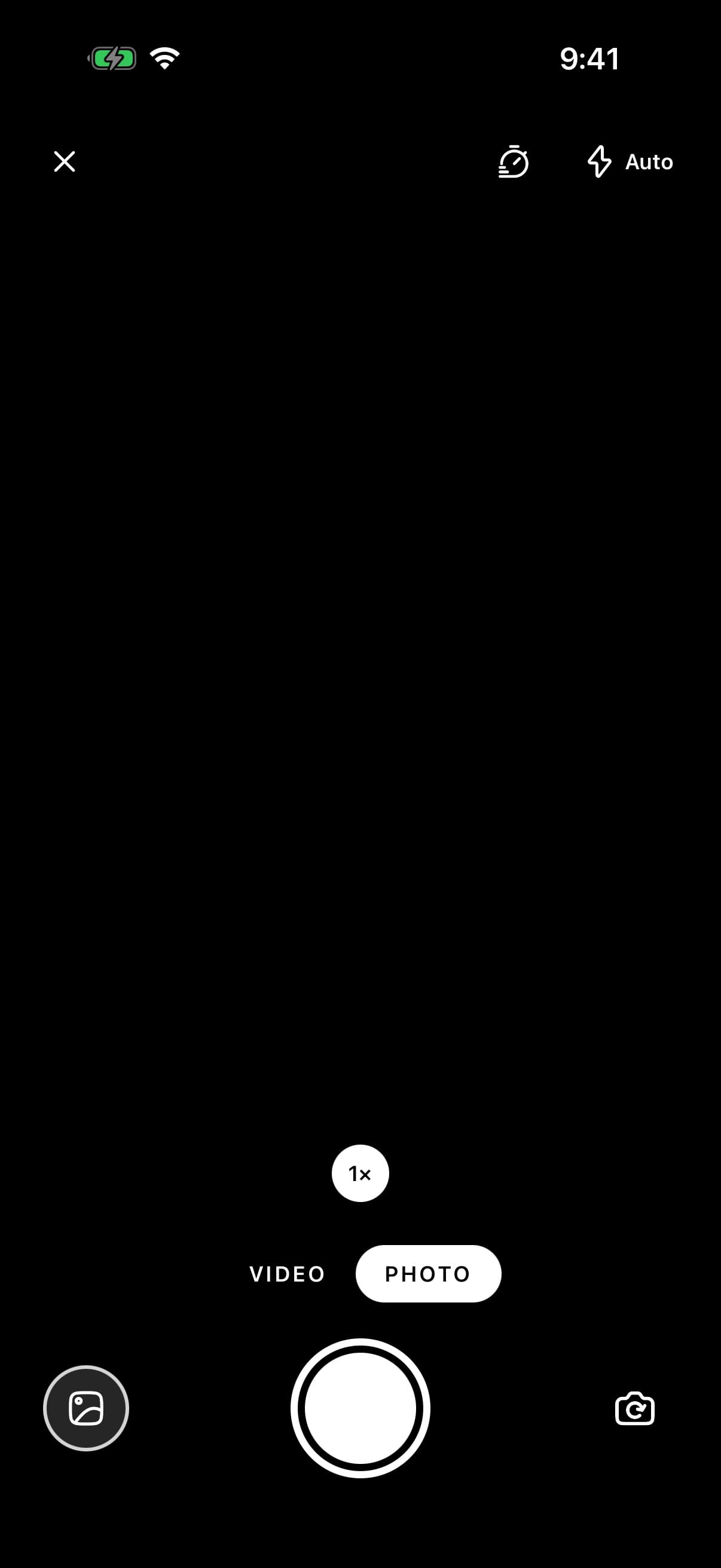
Use it for a screen whose job is taking a photo or recording a clip: a story composer, a document capture, a profile photo taken inside the app. The live picture fills the screen and the controls sit over it. Each control is a part, so a screen carries only the ones it needs.
Nothing you capture is kept by the component. Each photo and clip is passed to onCapture as the file the camera wrote, and keeping it, saving it to the photo library with expo-media-library or uploading it is up to you. Camera.Library works the same way: it shows the thumbnail you pass and calls onPress.
It needs the optional expo-camera, which runs in Expo Go. A development build also needs expo-camera's config plugin for the permission strings. The iOS Simulator has no camera: the preview stays black, a photo comes back as a placeholder image, and recording fails.
To let somebody pick a photo they already have, or take one with the system camera screen, use FileUpload. To frame a photo as a profile picture, use AvatarCropper.
Installation
Camera ships with the library — no separate install.
import { Camera, Button, XIcon, useCamera, type CameraCapture, type CameraPhoto } from 'panelui-native';Or copy the source into your project, to own and edit it:
npx panelui-cli@latest add cameraUsage
const [last, setLast] = useState<CameraCapture | null>(null);

<Camera onCapture={setLast}>
  <Camera.Preview />
  <Camera.Header>
    <Camera.Flash />
    <Camera.Duration />
    <Camera.Timer />
  </Camera.Header>
  <Camera.Footer>
    <Camera.Zoom />
    <Camera.Modes />
    <Camera.Controls>
      <Camera.Library
        source={last?.type === 'photo' ? { uri: last.uri } : undefined}
        onPress={openPhotos}
      />
      <Camera.Shutter />
      <Camera.Flip />
    </Camera.Controls>
  </Camera.Footer>
</Camera>
Composition
<Camera>
  <Camera.Preview />
  <Camera.Header>
    <Camera.Button />
    <Camera.Flash />
    <Camera.Duration />
    <Camera.Timer />
  </Camera.Header>
  <Camera.Footer>
    <Camera.Zoom />
    <Camera.Modes />
    <Camera.Controls>
      <Camera.Library />
      <Camera.Shutter />
      <Camera.Flip />
    </Camera.Controls>
  </Camera.Footer>
</Camera>Camera.Preview— The live picture, filling the camera. Two fingers zoom and a double tap switches cameras. Until camera access is given it asks for it in place. Its children are drawn over the picture and under the header and footer.Camera.Header— The band along the top, inside the safe area. A row, with its first child at the start and its last at the end.Camera.Footer— The band along the bottom, inside the safe area. A centred column.Camera.Controls— The row the shutter sits in. Put a Library, or a spacer of the same size, on one side and Flip on the other, so the shutter stays in the middle.Camera.Button— A round control for an action of your own, such as closing the camera. It is drawn like Flash and Timer, and its icon is coloured to match.Camera.Flash— Off, auto and on for a photo. Off and on for a video, where on lights the torch while recording.Camera.Timer— Off, 3 seconds and 10 seconds before a photo. Dimmed in video.Camera.Duration— The recording clock. It shows in video mode, and turns red while a clip is recording.Camera.Zoom— Zoom stops you label, and a bar that shows how far in the zoom is.Camera.Modes— Video or photo. Locked while recording.Camera.Library— The thumbnail you pass. A press callsonPress.Camera.Flip— Switches between the front and back cameras. Disabled while recording.Camera.Shutter— Takes a photo, after the timer if one is set, or starts and stops a recording. In video, holding it records until it is let go.
Examples
Photo only
Leave out the parts a screen does not need. Without Camera.Modes the camera stays in photo mode.
<Camera
  onCapture={(capture) => {
    if (capture.type === 'photo') setScan(capture.uri);
  }}
>
  <Camera.Preview />
  <Camera.Footer>
    <Camera.Controls className="justify-center">
      <Camera.Shutter />
    </Camera.Controls>
  </Camera.Footer>
</Camera>
Video with a limit
maxDuration stops a recording after that many seconds, and a ring around the shutter fills as it runs. In video, a tap on the shutter starts and stops, and holding it records for as long as it is held.
<Camera defaultMode="video" maxDuration={15} onCapture={keepClip}>
  <Camera.Preview />
  <Camera.Header>
    <Camera.Duration />
    <Camera.Flash />
  </Camera.Header>
  <Camera.Footer>
    <Camera.Controls>
      <View className="h-12 w-12" />
      <Camera.Shutter />
      <Camera.Flip />
    </Camera.Controls>
  </Camera.Footer>
</Camera>
Zoom stops you label
A zoom value is a fraction of the device's maximum zoom, and the maximum differs between phones, so the same value is a different magnification on each. Measure the values on the phones you target, and label them yourself. Left without stops, Zoom shows one 1× chip that undoes any zoom.
<Camera.Zoom
  stops={[
    { value: 0, label: '1×' },
    { value: 0.12, label: '2' },
    { value: 0.3, label: '5' },
  ]}
/>
A way out
Camera.Button is for actions of your own. On a screen that covers everything, it is the way back.
<Camera.Header>
  <Camera.Button onPress={() => router.back()} accessibilityLabel="Close">
    <XIcon size={20} />
  </Camera.Button>
  <Camera.Flash />
</Camera.Header>
A control of your own
useCamera() gives a control inside <Camera> the state and actions the parts use. Here a Button stands in for the shutter.
function TakeButton() {
  const camera = useCamera();
  return (
    <Button onPress={camera.press} disabled={!camera.ready} loading={camera.capturing}>
      {camera.countdown ? `${camera.countdown}` : 'Take photo'}
    </Button>
  );
}

<Camera onCapture={keep}>
  <Camera.Preview />
  <Camera.Footer>
    <TakeButton />
  </Camera.Footer>
</Camera>
Versions
Photo and video
The whole camera. What you take stays in memory, and the library button opens it in a sheet.
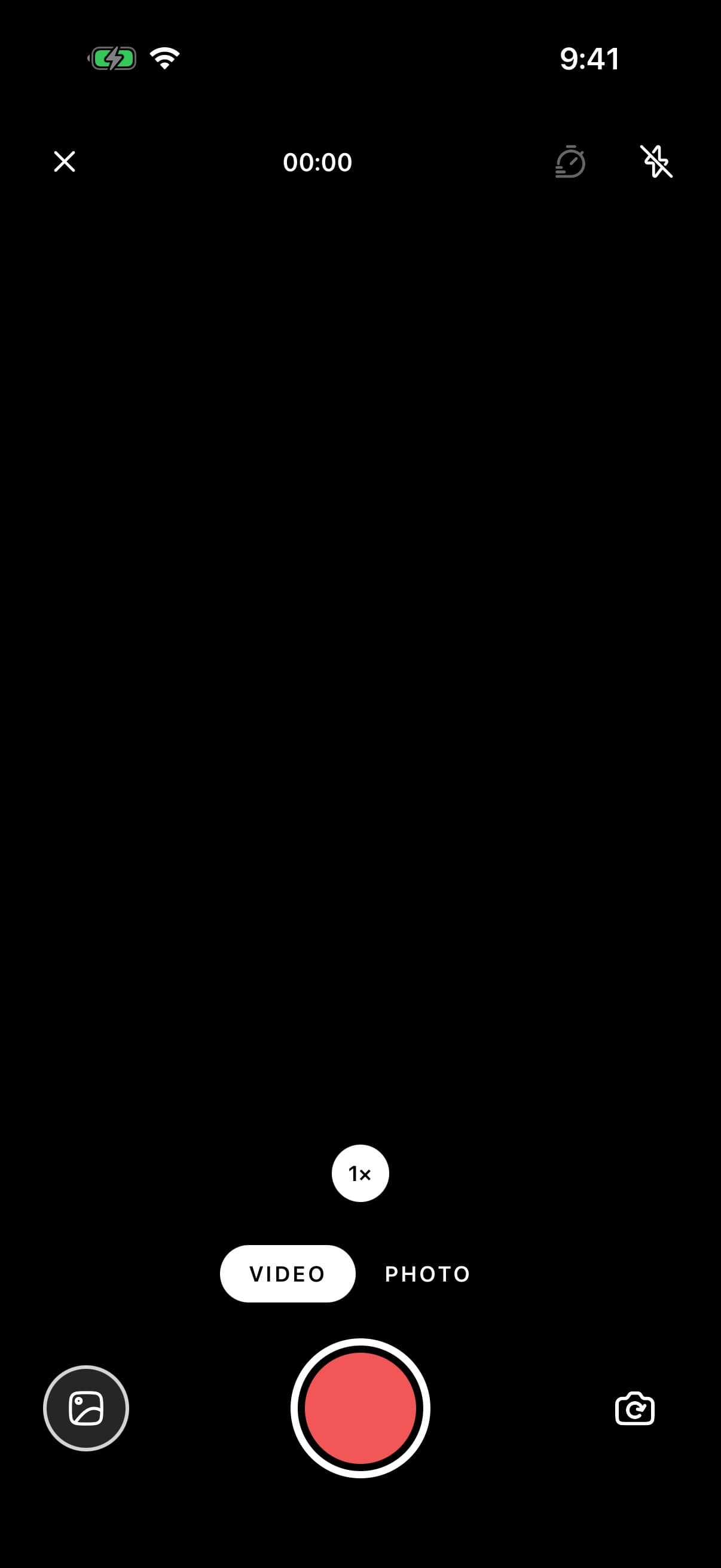
<Camera maxDuration={60} onCapture={(capture) => setShots((current) => [capture, ...current])}>
  <Camera.Preview />
  <Camera.Header>
    <Camera.Button onPress={() => router.back()} accessibilityLabel="Close">
      <XIcon size={20} />
    </Camera.Button>
    <Camera.Duration />
    <View className="flex-row gap-2">
      <Camera.Timer />
      <Camera.Flash />
    </View>
  </Camera.Header>
  <Camera.Footer>
    <Camera.Zoom />
    <Camera.Modes />
    <Camera.Controls>
      <Camera.Library
        source={latest ? { uri: latest.uri } : undefined}
        onPress={() => setOpen(true)}
        accessibilityLabel="This session"
      />
      <Camera.Shutter />
      <Camera.Flip />
    </Camera.Controls>
  </Camera.Footer>
</Camera>
Profile photo
The front camera with a circle to frame a face in. mirror saves the photo the way the preview showed it, and the app shows it for a yes or a retake.
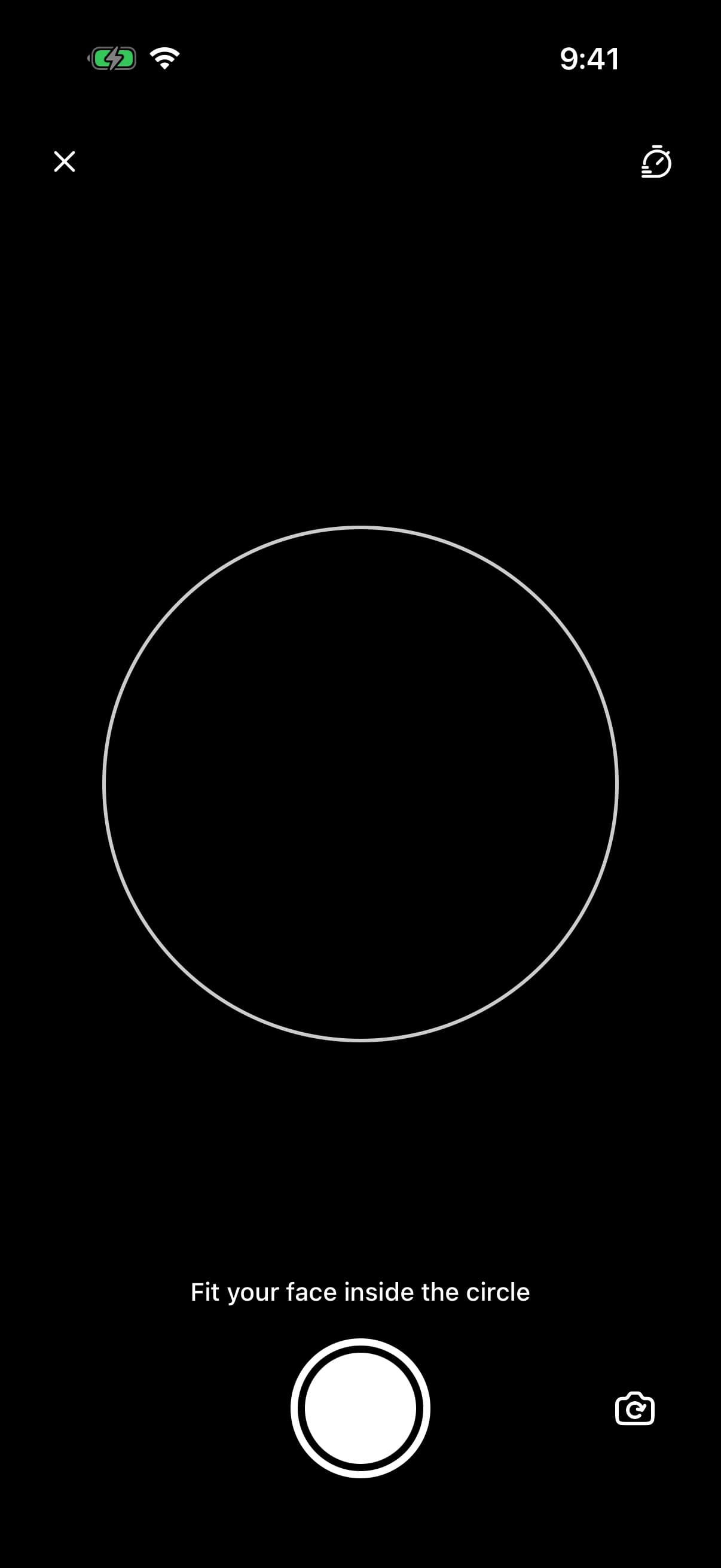
const [photo, setPhoto] = useState<CameraPhoto | null>(null);

<Camera
  defaultFacing="front"
  mirror
  onCapture={(capture) => {
    if (capture.type === 'photo') setPhoto(capture);
  }}
>
  <Camera.Preview>
    <View className="flex-1 items-center justify-center">
      <View className="h-72 w-72 rounded-full border-2 border-white/80" />
    </View>
  </Camera.Preview>
  <Camera.Header>
    <Camera.Button onPress={() => router.back()} accessibilityLabel="Close">
      <XIcon size={20} />
    </Camera.Button>
    <Camera.Timer />
  </Camera.Header>
  <Camera.Footer>
    <Camera.Controls>
      <View className="h-12 w-12" />
      <Camera.Shutter />
      <Camera.Flip />
    </Camera.Controls>
  </Camera.Footer>
</Camera>
Short clip
Video only, held to record and stopped at 15 seconds, with the ring around the shutter filling as it runs.
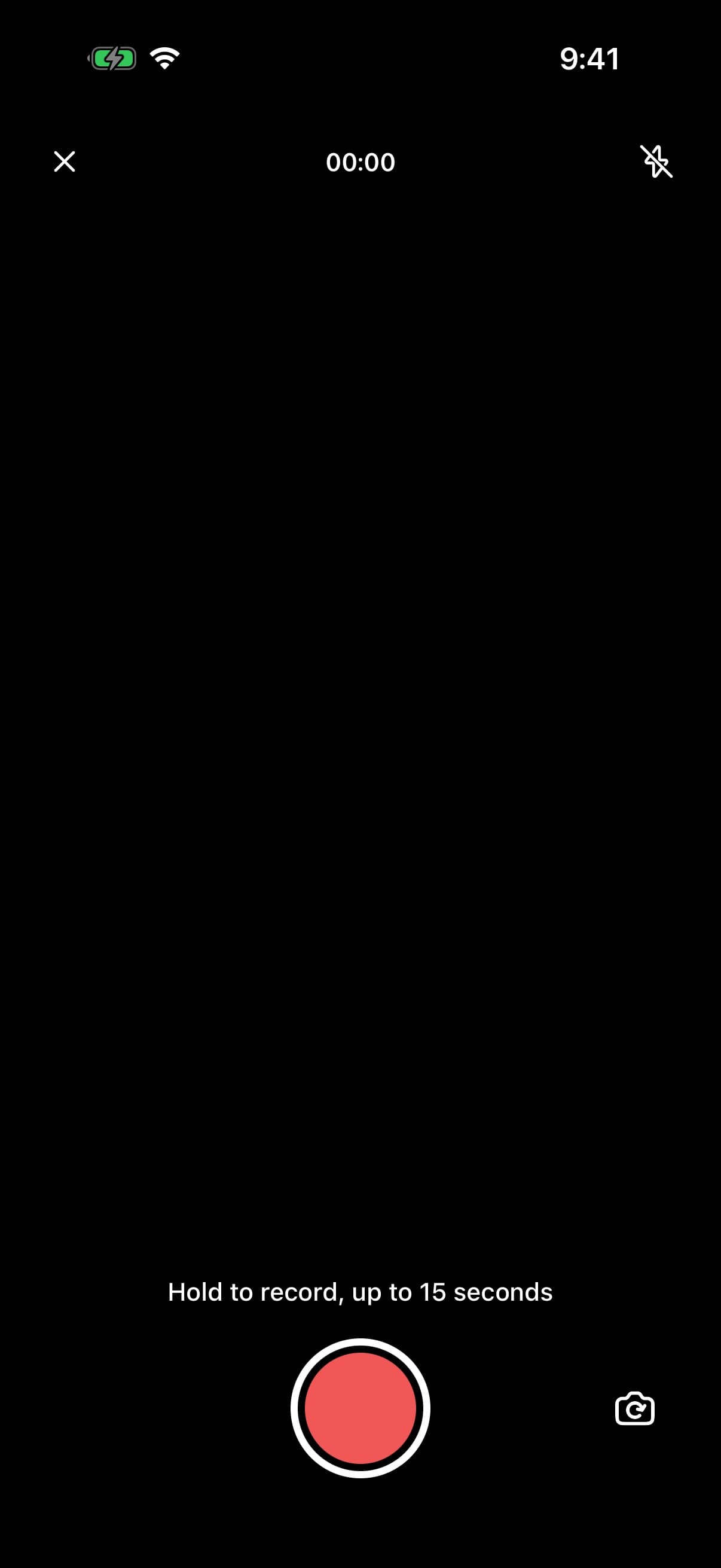
<Camera defaultMode="video" maxDuration={15} onCapture={keepClip}>
  <Camera.Preview />
  <Camera.Header>
    <Camera.Button onPress={() => router.back()} accessibilityLabel="Close">
      <XIcon size={20} />
    </Camera.Button>
    <Camera.Duration />
    <Camera.Flash />
  </Camera.Header>
  <Camera.Footer>
    <Camera.Controls>
      <View className="h-12 w-12" />
      <Camera.Shutter />
      <Camera.Flip />
    </Camera.Controls>
  </Camera.Footer>
</Camera>
API Reference
Camera
| Prop | Type | Default | Description |
|---|---|---|---|
className | string | — | Classes on the root, which fills its parent and is black. |
facing | CameraFacing | — | Which camera, controlled. |
defaultFacing | CameraFacing | 'back' | Which camera it opens on. |
onFacingChange | (facing: CameraFacing) => void | — | Called when the camera switches between front and back. |
mode | CameraMode | — | Photo or video, controlled. |
defaultMode | CameraMode | 'photo' | Photo or video to start in. |
onModeChange | (mode: CameraMode) => void | — | Called when the mode changes. |
flash | CameraFlashMode | — | The flash setting, controlled. In video, on lights the torch while recording. |
defaultFlash | CameraFlashMode | 'off' | The flash setting to start with. |
onFlashChange | (flash: CameraFlashMode) => void | — | Called when the flash setting changes. |
zoom | number | — | Zoom, controlled: 0–1, a fraction of the device's maximum zoom, which is a different magnification on every phone. Reset to 0 when the camera flips. |
defaultZoom | number | 0 | The zoom to start at. |
onZoomChange | (zoom: number) => void | — | Called as the zoom changes, many times during a pinch. |
timer | CameraTimerDelay | — | The self-timer, in seconds, controlled. Photos only. |
defaultTimer | CameraTimerDelay | 0 | The self-timer to start with. |
onTimerChange | (timer: CameraTimerDelay) => void | — | Called when the self-timer setting changes. |
onCapture | (capture: CameraCapture) => void | — | Called with each photo and clip. Nothing is saved: the file is where the camera wrote it, and keeping it, saving it or uploading it is up to you. |
onError | (error: Error) => void | — | Called when the camera fails to start, a capture fails, or microphone access is refused. Without it, these are logged in development. |
maxDuration | number | — | Stops a recording after this many seconds, and fills the shutter's ring towards it. |
mute | boolean | false | Record without sound, and without asking for the microphone. |
mirror | boolean | false | Save front-camera photos and clips mirrored, the way the preview shows them. Off, they are saved the way other people see you. |
pictureOptions | CameraPictureOptions | — | Options for every photo. |
cameraProps | CameraViewOptions | — | Passed to expo-camera's CameraView. |
haptics | boolean | true | A tick on the shutter, the flip and each setting change. |
safeArea | boolean | true | Keep the header and footer clear of the notch and the home indicator. |
Camera.Preview
| Prop | Type | Default | Description |
|---|---|---|---|
className | string | — | |
pinchToZoom | boolean | true | Two fingers zoom. |
doubleTapToFlip | boolean | true | A double tap swaps front and back. |
permissionTitle | string | 'Camera access' | Shown while camera access has not been given. |
permissionDescription | string | 'Allow access to the camera to take photos and record video.' | |
permissionAction | string | 'Allow camera' | The button that asks for access. |
settingsAction | string | 'Open Settings' | The button once access has been refused for good, which opens Settings. |
accessibilityLabel | string | 'Camera viewfinder' | Read out for the viewfinder, which a screen reader adjusts to zoom. |
Camera.Header
| Prop | Type | Default | Description |
|---|---|---|---|
className | string | — |
Camera.Footer
| Prop | Type | Default | Description |
|---|---|---|---|
className | string | — |
Camera.Controls
| Prop | Type | Default | Description |
|---|---|---|---|
className | string | — |
Camera.Button
| Prop | Type | Default | Description |
|---|---|---|---|
className | string | — | |
active | boolean | false | Drawn inverted, white with a black glyph, for a setting that is on. |
Camera.Flash
| Prop | Type | Default | Description |
|---|---|---|---|
className | string | — | |
labels | Partial<Record<CameraFlashMode, string>> | — | What each setting is read out as; auto's is also shown beside the icon. |
accessibilityLabel | string | 'Flash' |
Camera.Timer
| Prop | Type | Default | Description |
|---|---|---|---|
className | string | — | |
offLabel | string | 'Off' | What off is read out as. |
accessibilityLabel | string | 'Timer' |
Camera.Duration
| Prop | Type | Default | Description |
|---|---|---|---|
className | string | — | |
always | boolean | — | Show it in photo mode too, at 00:00. By default it appears in video only. |
Camera.Zoom
| Prop | Type | Default | Description |
|---|---|---|---|
className | string | — | |
stops | CameraZoomStop[] | — | The chips to show, each a value in expo-camera's 0–1 range with the label you give it. Left out, one 1× chip that undoes any zoom. The values that match a given magnification differ from phone to phone, so measure them on the devices you target before labelling them as one. |
bar | boolean | — | Show a bar of where the zoom sits in the range, which can be dragged, while zoomed in. |
Camera.Modes
| Prop | Type | Default | Description |
|---|---|---|---|
className | string | — | |
labels | Partial<Record<CameraMode, string>> | — | What each mode is called. |
Camera.Library
| Prop | Type | Default | Description |
|---|---|---|---|
className | string | — | |
source | ImageSourcePropType | — | The thumbnail: the last capture, or the newest photo in the library. An icon without one. |
accessibilityLabel | string | 'Photos' |
Camera.Flip
| Prop | Type | Default | Description |
|---|---|---|---|
className | string | — | |
accessibilityLabel | string | 'Camera viewfinder' |
Camera.Shutter
| Prop | Type | Default | Description |
|---|---|---|---|
className | string | — | |
holdToRecord | boolean | true | In video, holding the shutter records until it is let go. A tap still starts and stops. |
onPress | () => void | — | Replaces what a press does. The shutter still draws the camera's state. |
accessibilityLabel | string | — | Read out instead of the label it gives itself, which says what a press will do: take a photo, cancel the timer, record or stop. |
Every part also accepts the underlying React Native props (ViewProps or TextProps) and a className for Tailwind utilities.
Notes
Permissions
The preview asks for camera access in place the first time, with text you can change through permissionTitle, permissionDescription and permissionAction. Once access has been refused for good, its button opens Settings instead, since asking again would do nothing.
The microphone is asked for once video is used: expo-camera asks as soon as the camera first goes into video mode. If access is refused, a recording does not start and onError says why. Pass mute to record without sound and without asking.
A development build needs the permission strings from expo-camera's config plugin. Expo Go has them already.
[
  "expo-camera",
  {
    "cameraPermission": "Allow $(PRODUCT_NAME) to use the camera.",
    "microphonePermission": "Allow $(PRODUCT_NAME) to record sound with video."
  }
]
Zoom
zoom runs from 0 to 1, as a fraction of the device's maximum zoom. On iOS the maximum is raised to that fraction and on Android it is multiplied by it, and neither maximum is available to the app, so the same value is a different magnification on every phone.
Camera.Zoom never labels a value as a magnification itself. Give it stops you have measured; between them, its bar shows where the zoom sits in the range.
Zoom goes back to 0 when the camera flips.
Focus
There is no tap to focus. expo-camera has no way to focus on a point, and the camera keeps focus on its own.
Flash in video
expo-camera's flash lights photos only. In video, Camera.Flash switches between off and on, and on lights the torch while a clip records. A photo's auto counts as off in video.
Front camera
The front camera's preview is mirrored, like a mirror. Its photos and clips are saved the way other people see you, unless mirror is set, which saves them the way the preview showed them.
On the iOS Simulator
The Simulator has no camera. The preview stays black, a photo comes back as a placeholder image that expo-camera draws, and starting a recording fails with an error passed to onError. Try video and zoom on a device.
Accessibility
A screen reader adjusts the zoom on the viewfinder itself, a step at a time. The shutter's label says what a press will do: take a photo, cancel the timer, start recording or stop. The start and end of a recording are announced, and the modes are tabs.
Public exports
Values: Camera, hasCamera, useCamera
Types: CameraProps, CameraPreviewProps, CameraHeaderProps, CameraFooterProps, CameraControlsProps, CameraButtonProps, CameraFlashProps, CameraTimerProps, CameraDurationProps, CameraZoomProps, CameraModesProps, CameraLibraryProps, CameraFlipProps, CameraShutterProps, CameraHandle, CameraState, CameraCapture, CameraPhoto, CameraVideo, CameraPictureOptions, CameraViewOptions, CameraViewHandle, CameraZoomStop, CameraFacing, CameraFlashMode, CameraMode, CameraTimerDelay